Local Weather: Live & Hourly
- 4.2
- Rating
- 100.00K
- Installs
- Free
- Price
 Analysis by App-foxy
When I use a weather app, I do not need a wall of charts. I need a quick answer to a practical question: should I leave now, wait, or change my plans? Local Weather: Live & Hourly is built around that everyday decision. It is a free weather app from HLIMATE INNOVATIONS PRIVATE LIMITED, focused on local conditions, a short forward-looking forecast, and warnings for severe weather.
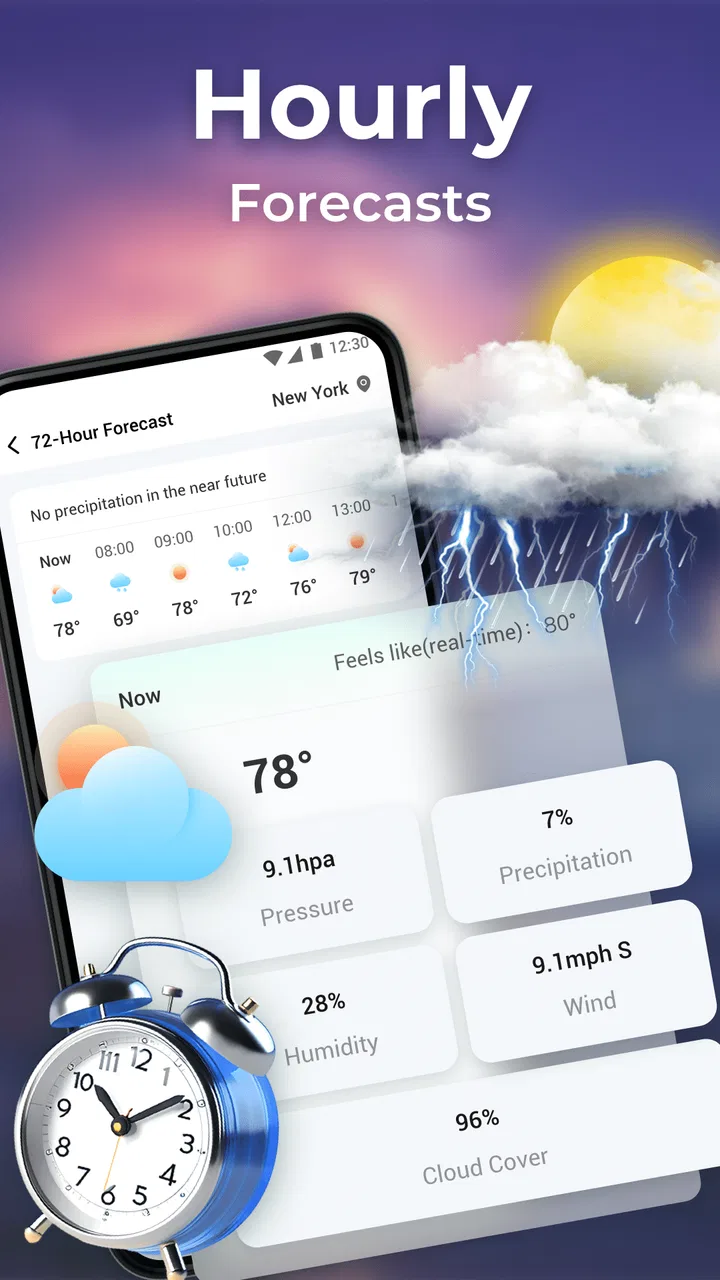
That focus makes it easy to understand. Rather than treating weather as something I have to study, the app is most useful as a quick check before commuting, walking the dog, hanging laundry outside, or deciding whether an outdoor plan is sensible. Its store summary highlights forecasts covering the next 72 hours alongside daily outlooks and extreme-weather alerts. In my experience, that combination is more useful than a simple temperature display because it connects the current situation with what may happen later in the day.
The app is rated 4.2 on average from 474 ratings, with 23 written reviews and over 100K installs. Those figures suggest a modest but established audience rather than a brand-new experiment. It is free, rated for Everyone, and works on Android 7.0 or later. The current version is 1.0.14, so Android users with older supported devices can still consider it without needing a recent phone.
You May Also Like

 Blood Strike: 2.5 Anniversary
Blood Strike’s Loadouts Turn Every Drop Into a Tactical Gamble
A close look at Blood Strike’s custom loadouts: how fast access to signature weapons reshapes its battle royale rhythm, rewards preparation, and narrows the gap between fights.

 Pandora - Music & Podcasts
Pandora’s Music Is Easy to Start, but Harder to Recover
Pandora’s strength is its low-effort path from a seed to a station. Its weak spot is how much confidence it asks you to place in connection, setup, and quiet recovery.

 8 Ball Pool
 Is Built on Rivalries, Rematches, and Routine
A close look at the rivalries, rematches, shared routines, and unanswered safety questions that turn a quick pool match into a persistent mobile community.

 Samsung Music
’s Quiet Strength Is Playing What You Already Own
Its reach comes less from spectacle than from dependable access to a personal library. That simplicity is both the app’s strongest retention engine and its ceiling.

 AccuWeather: Weather Radar
AccuWeather Review: A Quick, Clear Forecast for Everyday Decisions
For everyday plans, the best forecast is the one you can understand quickly. AccuWeather makes rain timing, radar, and local conditions easy to act on, with a few trade-offs.

 Hill Climb Racing
Why Hill Climb Racing Still Turns Crashes Into One More Run
A tiny car, a bumpy hill and one more upgrade: Hill Climb Racing keeps resurfacing because its simple chaos makes every near-miss feel personal.
More From Our News Desk
View All News


Why the 72-hour view matters more than a single current reading
The most important capability here is the short-range forecast window. A current temperature can tell me what is happening at the moment I open the app, but it does not answer whether I should start a journey now, postpone an errand, or carry an umbrella for the return trip. Looking across the next three days gives the app a more practical role: it becomes a planning tool rather than just a glanceable thermometer.
I find this especially helpful when the weather is changeable. A morning that looks comfortable may not stay that way through the afternoon, and a clear-looking day may still require attention if a warning is active. The 72-hour perspective encourages me to check the whole period around an activity instead of making a decision from one isolated number.
The daily forecast adds a broader layer to that short-term view. I can use the near-term information for immediate choices and the daily outlook for larger decisions, such as selecting which day is better for a visit, a walk, or outdoor chores. That separation is useful because hourly-style information can become too detailed when I am only comparing general conditions across several days.
The real strength is not simply showing more forecast information; it is putting immediate decisions and short planning in the same place. I do not have to switch between a current-conditions screen and a separate long-range summary to understand the basic shape of the weather ahead.
What extreme-weather alerts change in everyday use
Alerts are the other capability that gives this app more value than a decorative weather widget. A warning can change the priority of the information I am looking at. On an ordinary day, I may care mainly about comfort. During potentially dangerous conditions, I care more about noticing a serious change early enough to adjust my route or plans.
This is where I would use the app as a supporting check rather than as a replacement for local safety guidance. If an alert appears, I would treat it as a prompt to take the situation seriously and consult official local instructions when appropriate. The app can help bring attention to a risk, but a weather app should not be my only source during an emergency.
That distinction matters for families, commuters, and anyone who spends time outdoors. Alerts are most valuable when they lead to a clear action: delay a trip, avoid an exposed route, bring someone indoors, or reconsider an activity. They are less useful if I simply read them and continue without changing my plans.
How I use the forecast in practice
My preferred routine is quick and repeatable. I first check the local conditions before leaving, then look ahead far enough to cover the time I expect to be away. If I am planning something outdoors, I compare the immediate forecast with the daily view rather than trusting the first screen alone. This takes less effort than repeatedly searching for weather information from scratch.
A useful habit is to check before the activity and again before the return journey. For example, a short walk may begin in comfortable conditions but end after the weather has shifted. The 72-hour view makes this kind of planning easier because I can see the surrounding period without treating the current moment as the entire story.
Another practical workflow is to use the app before committing to a day, then return to it closer to the event. The daily forecast helps with the first decision, while the shorter forecast window becomes more relevant as the time approaches. I would not make a firm outdoor plan several days ahead based on one forecast alone, but I would use the app to identify the more promising option and then check again later.
For household tasks, the same approach works well. If I want to dry clothes outside, paint a small area, wash a vehicle, or plan gardening, I can look beyond the current conditions and consider whether the next part of the day is likely to remain suitable. The app does not need to turn that into a complicated project; its value is in reducing avoidable guesswork.
A realistic commuting example
Imagine I am leaving for work in the morning and expect to return in the afternoon. A current reading might show mild conditions, but that alone does not tell me whether I need rain protection later. I would use the local forecast to check the period covering both journeys, then look at the daily outlook to understand the broader pattern. If an extreme-weather alert is present, I would reconsider the route or timing instead of treating the commute as routine.
This is a small example, but it shows why the app’s emphasis matters. The useful question is not “what is the temperature right now?” It is “what conditions am I likely to face while my plan is still in progress?” A short-range forecast is better suited to that question than a single current-condition card.
For parents, the same workflow can help with school runs and outdoor activities. I would check before children leave, consider the time they will be outside, and pay particular attention to any alert. For people who work outdoors, the app can provide a quick planning reference before a shift, although important work-safety decisions should still use the appropriate official information for the area.
Where it fits beside usual weather alternatives
Many people already rely on a built-in phone weather panel, a search engine result, or a large weather service with maps and radar. Local Weather: Live & Hourly makes more sense for someone who wants a focused local check with short-term planning and alerts, without necessarily needing an extensive weather dashboard.
Compared with a basic phone widget, the 72-hour outlook and daily forecast provide more context for planning. A widget is excellent when I only want a fast glance, but it may not encourage me to consider the rest of the day or the following days. This app is better when I am making a decision rather than merely checking a number.
Compared with feature-heavy weather platforms, the appeal is simplicity. Advanced services can be preferable for users who need detailed maps, storm tracking, historical comparisons, or specialist information. Someone who follows weather systems closely may find a focused local forecast less satisfying than a full meteorological dashboard. I would choose a larger alternative when visual analysis is central to my decision.
There is also a difference between convenience and authority. A general weather app is convenient for routine planning, while official alerts and local emergency channels remain more important when conditions become dangerous. I see this app as a useful first layer: it helps me notice what deserves attention, then I can seek more specific guidance if the situation requires it.
Small habits that make the app more useful
First, I would avoid checking only the temperature. The daily and short-range forecast are more valuable when I compare the entire period that matters to me. A comfortable current reading can be misleading if my activity lasts several hours.
Second, I would treat an alert as a decision point, not just a notification to dismiss. If the app highlights extreme weather, I would ask what part of my plan needs changing. That might mean carrying suitable clothing, leaving earlier, postponing an outdoor task, or checking local safety information.
Third, I would use the forecast as a planning aid rather than a guarantee. Weather changes, and a forecast is most helpful when I revisit it near the time of an activity. This is particularly important for plans made several days ahead: the daily view can guide the initial choice, but the nearer forecast should influence the final decision.
Fourth, I would keep the app’s role narrow. It is not necessary to open it for every minor decision, and people who already have a trusted weather routine may not gain much from adding another source. Its best use is as a clear, local reference when I want immediate conditions plus a short look ahead.
Trade-offs I noticed before recommending it
The focused design is also its main limitation for certain users. If I want a deep analysis of weather patterns, the app may feel less complete than a specialist service. Its purpose is easier to appreciate when I value quick planning over extensive meteorological detail.
Another trade-off is that alerts can create a false sense of completeness if I treat them as the final word. A warning feature is helpful, but it does not remove the need for judgement. Local terrain, travel conditions, and official instructions can matter in ways a general app view cannot fully replace.
The app is also less compelling for someone who only wants a tiny glance from a home-screen widget or notification shade. If my needs stop at seeing the current temperature, a built-in phone tool may be faster. I would install this one when I want the extra context of the next hours and daily outlook, not merely a single number.
Because it is free, it is easy to try without a purchase decision. That makes the comparison straightforward: install it, use it during a few ordinary planning moments, and see whether its local forecast view fits the way you make decisions. The Everyone rating also makes it suitable for a broad household audience, including people who want a straightforward weather reference rather than a technical tool.
Who benefits most from this particular approach
I think the strongest audience is anyone whose day depends on timing. Commuters, walkers, parents, delivery workers, gardeners, travelers making short local plans, and people who regularly schedule outdoor chores can all benefit from seeing current conditions together with the near-term forecast.
It is also a good fit for users who find large weather apps distracting. The combination of local weather, daily planning, and extreme-weather alerts gives the app a clear purpose. I can open it with a question in mind and leave once I have enough information to act.
I would be more cautious about recommending it to weather enthusiasts who need detailed visual tools or to professionals whose safety decisions require specialized forecasts. In those cases, a more advanced service or official source may be the better primary option. This app can still serve as a convenient secondary check, but it should not be chosen for capabilities outside its practical focus.
The developer, HLIMATE INNOVATIONS PRIVATE LIMITED, has positioned the app in a useful middle ground: more informative than a minimal current-weather display, but less demanding than a technical weather platform. Its audience size, with over 100K installs, shows that the approach has reached a meaningful group of Android users, while the 4.2 average gives it a generally positive reception without suggesting that it will satisfy everyone.
My final view after using it for daily planning
Local Weather: Live & Hourly earns its place on my phone because it answers a practical question well: what should I expect locally over the next part of my day, and do any serious conditions deserve my attention? The 72-hour forecast, daily outlook, and extreme-weather alerts work together around that decision instead of presenting weather as information with no clear use.
I would recommend it to someone who wants a free, approachable weather app for commuting, errands, outdoor tasks, and short-term planning. I would not present it as a complete replacement for official emergency information or a specialist weather platform. Its value is more specific and, for many people, more useful: it turns a quick local check into a better-informed plan.
For me, that is the right balance. I can use the current view for an immediate choice, the short forecast for the hours ahead, the daily outlook for comparing plans, and the alerts as a reason to pay closer attention. If that is how you use weather information, this app is worth trying. If you need advanced maps, technical detail, or only a tiny widget glance, another option may suit you better.
FAQs for Local Weather: Live & Hourly
01What features does Local Weather: Live & Hourly offer?
Local Weather: Live & Hourly provides real-time weather updates, including temperature, humidity, wind speed, and precipitation. Users can view hourly forecasts, check severe weather alerts, and customize notifications. The app also offers radar maps for a visual representation of weather patterns, making it a comprehensive tool for planning daily activities.
02Is Local Weather: Live & Hourly free to use?
Local Weather: Live & Hourly is free to download and use, offering basic weather information at no cost. However, it may include in-app purchases or a subscription model to unlock premium features, such as ad-free usage and advanced weather data. Users can choose the level of service that best suits their needs.
03How accurate is the weather data in Local Weather: Live & Hourly?
The app sources its data from reliable meteorological services, ensuring high accuracy in weather information. While no weather app can guarantee 100% precision due to the unpredictable nature of weather, Local Weather: Live & Hourly is designed to provide timely and accurate forecasts to help users make informed decisions.
04Does Local Weather: Live & Hourly require internet access?
Yes, Local Weather: Live & Hourly requires an internet connection to update weather information and provide real-time data. Users need either Wi-Fi or mobile data to access the latest forecasts and weather alerts, ensuring they receive the most current information available.
05Can I customize notifications in Local Weather: Live & Hourly?
Absolutely. Local Weather: Live & Hourly allows users to customize notifications based on their preferences. You can set alerts for specific weather conditions, like rain or snow, and choose the time for receiving daily forecasts. This flexibility ensures that users stay informed about weather changes that matter to them.
Pros
- Accurate and up-to-date weather forecasts.
- User-friendly interface with easy navigation.
- Customizable notifications for severe weather.
- Detailed hourly weather updates.
- Supports multiple locations for travel planning.
Cons
- Ads can be intrusive and distracting.
- Limited features in the free version.
- Occasional lag in loading data.
- Some data requires internet connection.
- Widgets lack customization options.

Local Weather: Live & Hourly
Gallery